
DFRobot Wheel Encoders for DFRobot 3PA and 4WD Rovers (2pk)
Description
- Voltage:+5V
- Encoders are designed for DFRobot 3PA and 4WD Rovers
- Can give you the rotation degree of the wheels
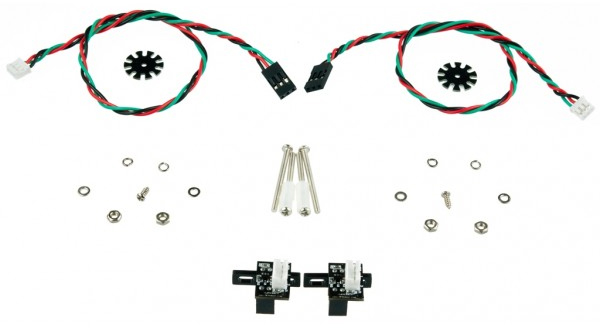
- Includes encoders, plastic tube, paper-mediated gasket etc
The DFRobot Wheel Encoders for DFRobot 3PA and 4WD Rovers (2pk)are designed for manufacturer 3PA and AWD Rovers. It can give you the rotation degree of the wheels. Encoder uses non-contact method to convert the angular displacement signals. Best fit with Micro DC Geared Motor. It includes encoders, plastic tube, paper-mediated gasket etc.
ZIP File
- Voltage: +5V
- Current: <20mA
- Resolution: 20 PPR
- Weight: 20g
1. You cannot fit the back panel to the DFRobot 4WD Mobile platform with these sensors attached to the rear motors. I will eventually do my own 3D printed rear panel to solve this and the top/bottom plate hold the robot together OK without the panel for now. 2. There is a lot of retriggering/bouncing of the signal and to get close to the 20 CPR I'm using a sliding debounce ignore time of 12,000 us at max speed and higher for slower speeds. I don't know how useful these sensors will be to accurately monitor distance/speed
Seem to do the job. Gives 5v signal when photo interrupter is blocked by the disk. So far they seem to work reliably. Does not mount on RB-Sbo-02 GM3 - Gear Motor 3 - 90 degree Shaft without modification.
Install requires some work to space the encoder wheels with the plethora of washers and spacers provided. I have a different take on the discussion by another reviewer on the interrupts. You do get different counts based on the pin you connect to, but that is due to the Atmega interrupt scheme. Different chips have different interrupt architectures. Leonardo boards use the 32U4 chip, which have a dedicated interrupt signal on pins 2 and 3, while the UNO uses the 328 chip, which does not. If a pin does not have a dedicated interrupt, it gets lumped into a 'pin-change' interrupt with all the other digital pins that don't have dedicated interrupts. When I used a UNO board and pins 2 and 3, I would get 'cross-talk' between the wheels. It seems that the Arduino library gets the interrupt and tries to decide which registered callbacks should be invoked base on the pin states. If there are more than one 'pin-change' interrupt callback, it seems to be able to get confused. I solved this by manually checking for a pin change-of-state in the interrupt handlers. After doing this (and adding some debounce code as well), I got very consistent count numbers.
These are a little tricky to install on an assembled robot but the instructions are perfect. Once you try to use encoders comes the confusion, at least when using an Arduino mega. I found different readings per wheel and thought there was an encoder problem until I ran an experiment with different intercepts. Someone should write a tutorial on using encoders and intercepts. Here is what I found when using the same encoder at the same speed on different intercept pins: right encoder on intercept 0 (pin 2) Count = 148 right encoder on intercept 3 (pin 20) Count = 28 right encoder on intercept 2 (pin 21) CountA= 28 right encoder on intercept 4 (pin 19) Count = 1276 right encoder on intercept 5 (pin 18) Count = 908 Once you understand this you can make use of whatever formulas per encoder you need to achieve speed or distance results for the wheel pairs.
Estimate shipping
WARNING: This product can expose you to chemicals including lead and lead compounds, which are known to the State of California to cause cancer and birth defects or other reproductive harm. For more information go to: www.P65Warnings.ca.gov.
Refund Policy
If you are not satisfied with a product purchased from the Site, you may request a return within 30 days from the delivery date, unless the product is listed under the Return Exceptions below or is subject to specific return conditions noted on the product page.
This return policy also applies, as a minimum standard, to products sold and fulfilled by third-party vendors through the Marketplace.
Please review the Return Conditions, Return Exceptions and the process on How to Request a Return Authorization (RA) before initiating a return request.
Returns under this policy concern non-defective products. In the case of a confirmed manufacturing defect, remedies are handled under the Warranty terms, at the Vendor's discretion. See the Warranty section.
Return Conditions
To qualify for a refund under the 30-day return policy, all of the following conditions must be met:
- A valid Return Authorization (RA) number must be obtained prior to returning the product. Returns without an RA number will be refused.
- The RA number is valid for 30 days. The returned item must be received within that period.
- The RA number must be included with the return.
- Products must be returned in unused, unmodified condition (e.g., no scratches, alterations, missing parts, or signs of installation/use) and in their original packaging, suitable for resale.
- Shipping fees are non-refundable. Return shipping costs are the responsibility of the customer, except in cases of a product confirmed defective through RobotShop's troubleshooting process or of a verified shipping error by RobotShop.
- Refunds are processed within 7 days after receipt and inspection of the returned item.
- A $100 cleaning fee may apply to domestic robots returned in used or unclean condition.
- A 20% restocking fee may apply to large-quantity returns of items ordered specifically for the customer from the manufacturer or not part of RobotShop's standard inventory.
Return Exceptions
The following products are not eligible for return or refund under this policy:
- Used, damaged, or modified products — Items that show signs of use, wear, or alteration, making them unsuitable for resale.
- Consumables — Use and wear-and-tear components, altered or depleted through use (e.g., batteries, belts, brushes, gears, filament, tires, disposable bags, lubricants, greases, waxes, etc.). Not eligible for return once opened or used.
- Perishables — Goods liable to deteriorate or expire rapidly. Not eligible for return.
- Sealed goods (health or hygiene) — Items sealed for health-protection or hygiene reasons (e.g., masks, gloves, odor-absorbing products). Not eligible for return once unsealed.
- Build-it-yourself products and items requiring customer assembly — Including robots & kits, robot parts, and other products requiring assembly or soldering. Not eligible for return once assembled, soldered, or installed.
- Digital Goods, Software, and Apps — Final sale only, due to licensing restrictions.
- Clearance Items — Products identified as clearance or final sale, including end-of-life or discontinued items.
- Custom-made, personalized, or special-order items — Products manufactured, configured, adapted, or built to the customer's own specifications and requirements.
- On-Demand Items — Standard catalogue products not stocked by RobotShop and ordered specifically to fulfill a customer request.
- Professional & Specialized Equipment — See the Professional & Specialized Equipment Warranty page and Professional & Institutional Buyers (B2B) section in the Terms & Conditions.
How to Request a Return Authorization (RA)
While the same return policy applies, these orders require a separate contact process for returns.
- RobotShop Fulfilled Orders → submit a support ticket from your account under My Support Tickets.
- Marketplace Vendor Orders → submit a ticket from your account under My Marketplace Tickets to contact the vendor directly.
Note: Marketplace vendor products are normally labelled with SKUs starting with RM, and identified on the product page with the mention "Sold and fulfilled by [Vendor Name]".
